Record how to handle a dog
SOP GRM-08 · Groomer manual
1 Purpose
Record how hard a dog is to handle, what sets it off and what helps, so the next groomer knows before they start.
2 Applies to
Every groomer, after any groom where the dog’s handling is worth knowing.
3 Before you begin
- You are signed in to your profile.
- The dog’s card is open. See GRM-02 Check in a dog, steps 2 to 4.
4 Procedure
4.1 Add a handling note
Find the Handling box on the dog’s card. Click + Add note at its top right. The handling form opens.
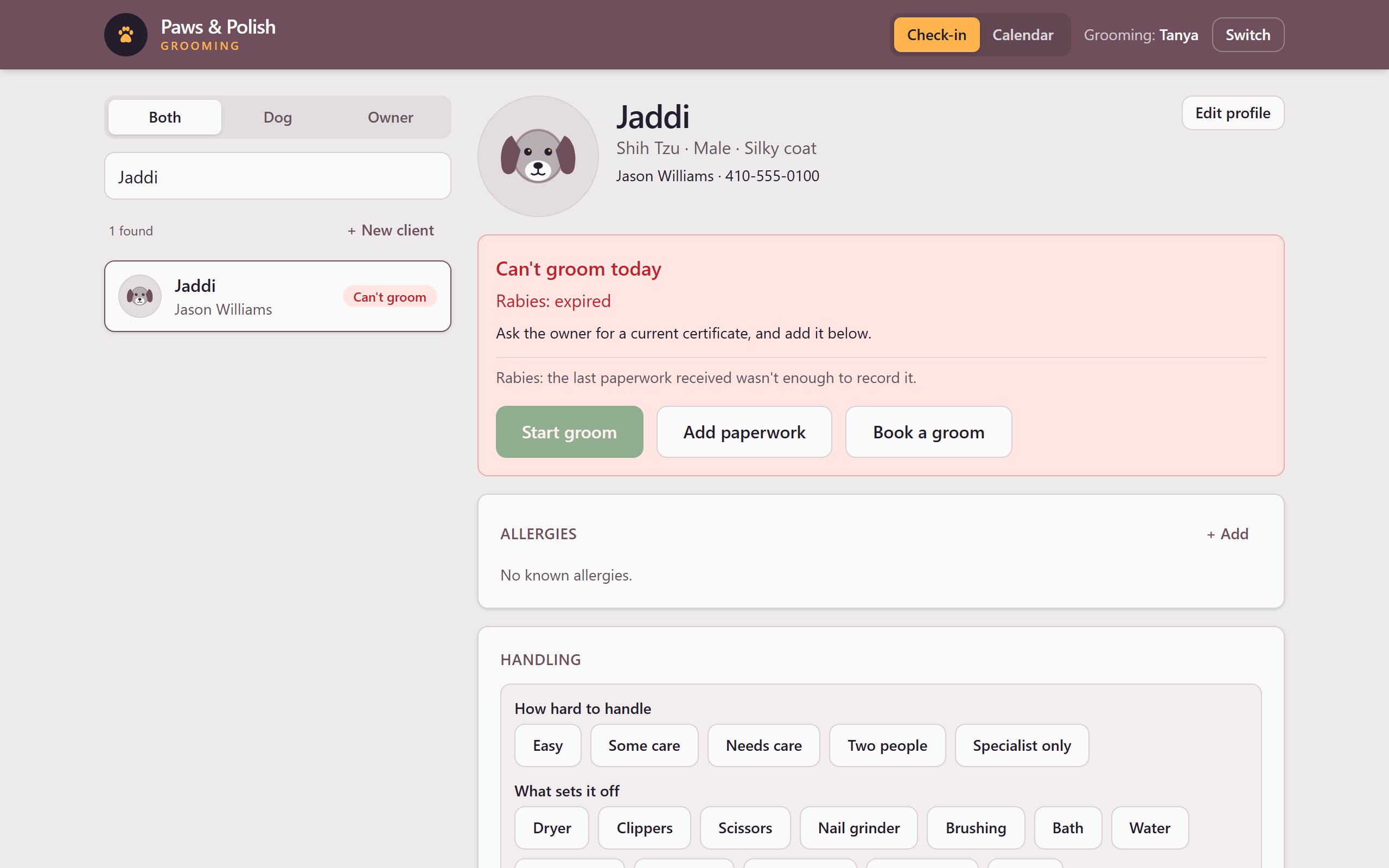
Adding a handling note Under How hard to handle, click one: Easy, Some care, Needs care, Two people or Specialist only. This is required.
Under What sets it off, click everything that applies, for example Dryer, Clippers or Being held. This is optional.
Under Where on the dog, click the part of the dog, if the problem is in one place. This is optional.
Click What happens, and what helps and type a short note, for example “Fine with the stand dryer on low”.
Click Add note. The note appears in the Handling box.
4.2 Correct a handling note
Use this only to correct a note that was typed wrong. If the dog’s behaviour has changed, add a new note instead, so the history shows the change.
- In the Handling box, click Change beside the note.
- Correct the note.
- Click Save change.
5 Result
The Handling box on the dog’s card shows each handling note.