Record the haircut and finish the groom
SOP GRM-13 · Groomer manual
1 Purpose
Record what was done on the visit (services, coat, style and any changes from the dog’s usual) and finish the groom, so the next groomer starts from it.
2 Applies to
Every groomer, at the end of every groom.
3 Before you begin
- The groom was started with Start groom. See GRM-02 Check in a dog.
- The dog’s card shows Being groomed.
4 Procedure
Click Record the haircut on the dog’s card. The Record the haircut form opens. At the top, it shows the dog’s Usual style and what was done Last time.
To go back to the dog’s card without saving, click Back to the dog’s name at the top right. The groom stays open.
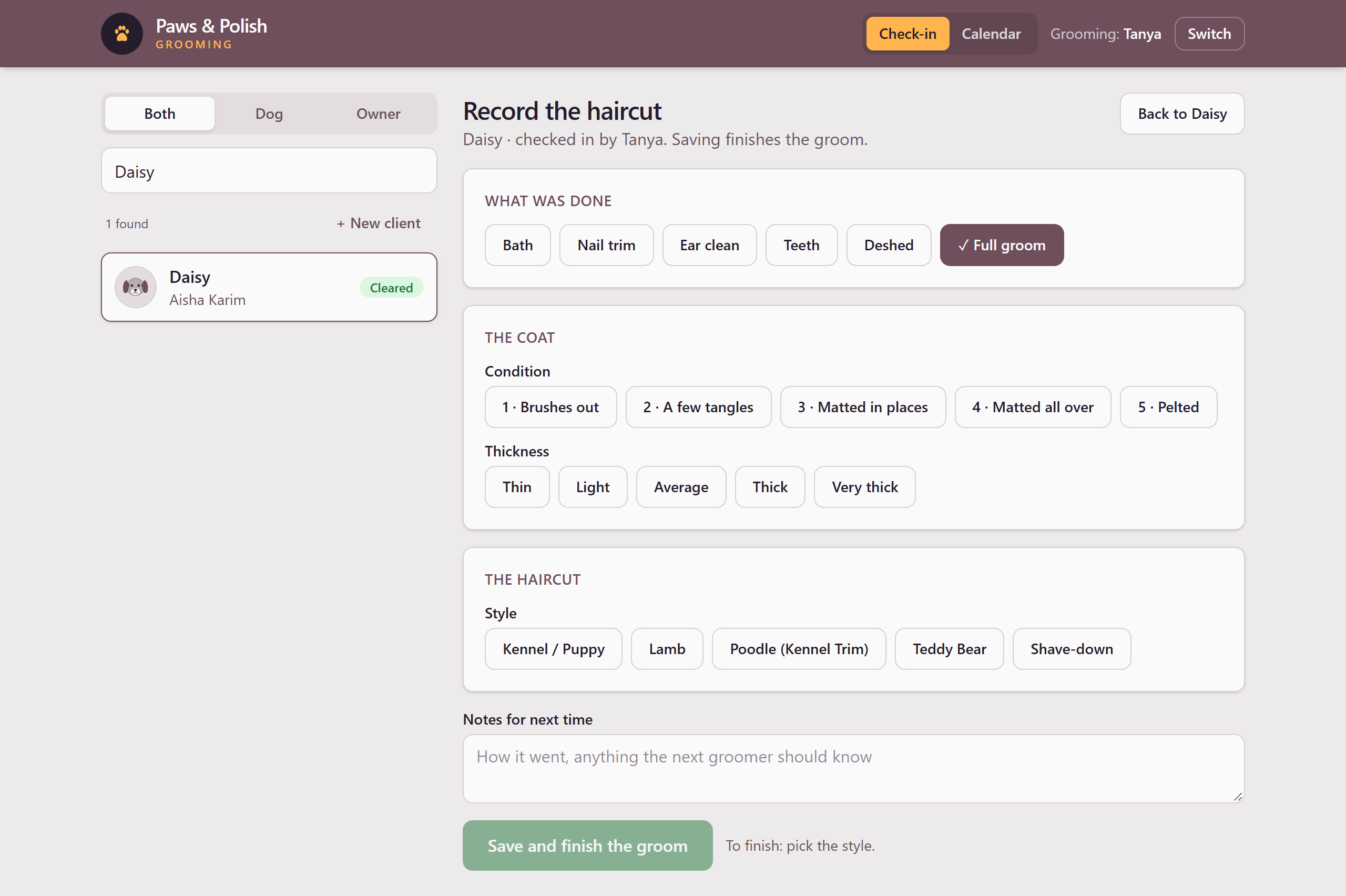
The Record the haircut form
4.1 What was done
- Under What was done, click each service done on this visit, for example Bath, Nail trim and Full groom. A ticked service shows ✓. Only Full groom records a haircut.
4.2 The coat
- Under Condition, click the number that matches the coat, from 1 to 5.
- Under Thickness, click the coat’s thickness.
4.3 The haircut
This part appears only when Full groom is ticked. It starts from the dog’s usual style.
- Under Style, click the style done today. Under Length, click the length.
- Under Zone by zone, change only the parts of the dog you did differently from the style, by choosing a different cut for that zone. To put a zone back, click Undo beside it.
- If the haircut is different from the dog’s usual, the form asks Why is it different from the dog’s usual today? Click a reason, for example Owner asked or Coat condition, or type one.
- To make today’s haircut the dog’s usual style from now on, tick Make this the dog’s usual style from now on. The next groom starts from it.
4.4 Finish
- Click Notes for next time and type how it went and anything the next groomer should know.
- Click Save and finish the groom.
5 Result
The groom is finished. The dog’s card no longer shows Being groomed, and Last visit shows today’s haircut.
6 If something goes wrong
6.1 To finish: …
Save and finish the groom cannot be clicked. The words after To finish: list what is still missing. Fill in each one.
6.2 Matted all over: a #7F shave-down.
You chose Shave-down for a matted coat. Tell the owner it will be short, and why.
6.3 Pelted: shaved close with a #10.
The coat is at the worst condition. Tell the owner the shave can leave the skin red, itchy or nicked, and that the coat takes months to grow back. Then tick the box to confirm you have told them. The groom cannot be finished without it.
6.4 A coat at level … doesn’t call for a shave-down.
A shave-down on a coat in this condition needs a manager’s OK. Ask a manager. Click Reason and type why, then under OK’d by click the manager who agreed.
6.5 … is under the shop’s grooming age.
The dog is a puppy under the shop’s minimum age for a haircut. A haircut needs a manager’s OK. Click Reason and type why, then under OK’d by click the manager who agreed.